

AI Native Product Practice: When Judgment Becomes the Core Competency
Shared on: June 1, 2026
Shared by: @Ding Hao
In an era where AI can generate documents, write code, and even design interfaces, what exactly is the core competency of a product manager?
As the AI native era arrives, the answer has become increasingly clear: the core competency no longer lies in execution capability, but more crucially in judgment.
As a product lead from a non-technical background, I used to spend 80% of my time on execution—writing requirement documents, coordinating design reviews, and tracking development progress. This work was undoubtedly important, but in essence it was largely a translation process of "turning ideas into executable instructions," leaving precious little time for genuine strategic thinking and value judgment.
Today, AI is changing this way of working.
Through the deep integration of Cursor + Claude Code + Linear, I have successfully handed that 80% of execution work over to AI, allowing my personal energy to focus on the 20% of core judgment.
The first is judging what to do—anchoring on the most valuable 10% out of the hundreds of ideas that emerge from AI;
The second is judging what not to do—cutting out 30% of "logically complete but unnecessary" redundant design through professional assessment;
The third is judging whether it's done right—ensuring AI output aligns with the product vision through rigorous Review.
In this article, I want to share my hands-on practice of the AI Native product workflow. Under this working model, going from a "vague idea" to an "executable requirement" takes only 9 minutes, a direct efficiency gain of 83%. Code delivery is completed the instant the design is confirmed, completely eliminating the "translation loss" between design and development. One person can even close the loop on the entire process from requirements and design to code. The role boundaries of product work are continuously blurring, and judgment is thereby becoming the core value of the product professional.
After all, AI handles efficient execution, and humans need only focus on key decisions.
Beyond this, in this article you will find a complete and reusable AI Native product working methodology, including:
- The three-layer abstraction model: an AI-assisted collaboration framework spanning the idea layer, the spec layer, and the execution layer;
- Breakdowns of real cases: two complete workflows covering requirement analysis, interface design, and frontend implementation;
- Presentation of impact data: efficiency gains of 70–85%, with quality trending toward stable and controllable;
- A judgment practice guide: how to effectively review AI output, scientifically subtract, and systematically control quality;
- Plug-and-play solutions: practical resources covering command design, design system construction, directory structure conventions, and more.
Core idea: The stronger AI becomes, the more important human judgment is. AI can help you do 100 things, but selecting the 10 most worthwhile ones out of those 100 is where human core value truly lies.
01 Background | Slicing Up the Work of a Product Lead
As a product lead from a non-technical background, my daily work—from strategic planning to execution on the ground—can be broken down into two modules: the strategy layer and the execution layer.
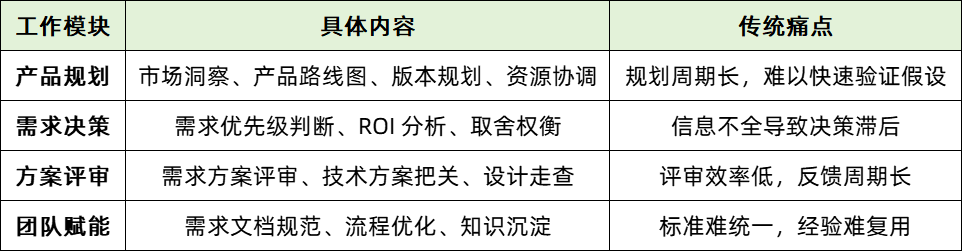
1) The Strategy Layer
The strategy layer comprises four work modules, each with clearly mapped content and traditional pain points:
2) The Execution Layer
The execution layer likewise has clearly defined content and traditional difficulties:
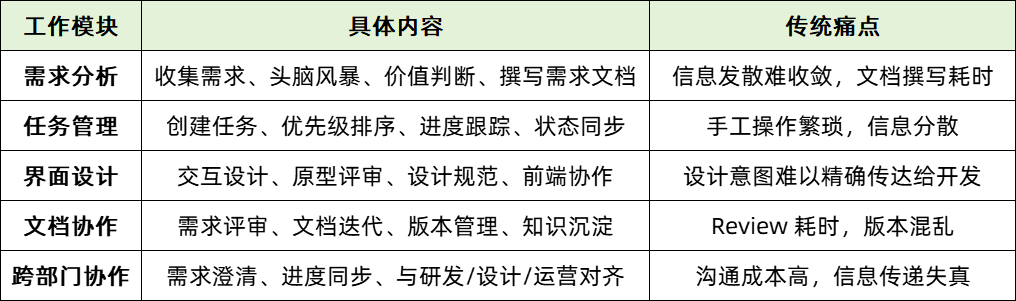
The core problem behind all this work is that a product lead from a non-technical background, within the chain of "strategy → requirements → implementation," lacks the corresponding technical means to accomplish four things: rapidly structuring strategic intent and vague ideas, generating specification documents that developers can use directly, efficiently reviewing proposals to reduce back-and-forth communication costs, and establishing standardized processes so that the team produces output of consistent quality.
The changes that AI brings are embodied through the toolset of Cursor + Claude Code + Linear. A product lead from a non-technical background can describe ideas in natural language and have AI automatically generate structured requirement documents and design specifications; quickly review documents and generate structured feedback, greatly improving review efficiency; directly participate in discussions of design specifications and frontend implementation, reducing information loss; and at the same time establish reusable document templates and workflows to empower the team.
02 Methodology | The Three-Layer Abstraction of AI-Assisted Product Work
Drawing from work practice, let me first share the core methodology I have summarized: AI-assisted product work can be abstracted into 3 layers.

The first is the idea layer. At this layer, AI is mainly responsible for expanding ideas around the intended direction, filling in details, and turning vague ideas into structured proposals. The human's core responsibility is to filter the generated content, assess its value, and make key trade-offs. The core division of value here is that AI helps with expansion and structuring, while humans handle filtering and subtraction.
The second is the spec layer. Once at this layer, AI can automatically generate Product Requirement Documents (PRD Specs) and interface design documents (UI Specs) based on requirements and design specifications. The human role shifts toward confirming boundaries and setting constraints, ensuring the output meets business and experience requirements. The value logic here is that AI generates documents according to specifications, while humans define constraints and frameworks.
The third is the execution layer. At this layer, AI directly takes on the tasks of code generation and implementation optimization, producing ready-to-use code and related tickets (Issues). At this point, the human's work focuses on defining acceptance criteria, conducting quality reviews, and gatekeeping the final output. The core division of labor at this stage is reflected in AI handling efficient implementation, while humans control quality and standards.
Key insight: The stronger AI becomes, the more important human judgment is. AI can help you do 100 things, but choosing which 10 to do is the human's core value.
03 Cases | Applied Practice and Effectiveness Analysis
Theory only reveals its value in real combat. Through two real cases, I present a showcase of AI Native product implementation in practice and analyze the final results.
Case 1: The Requirement Analysis Workflow
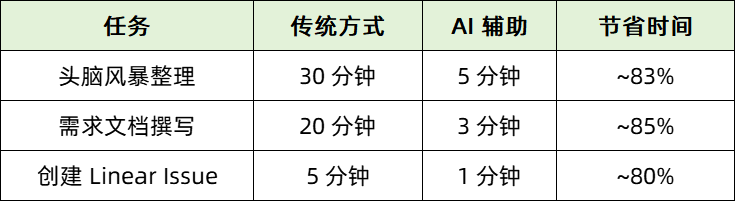
Under the traditional working model, product managers often get trapped in a tedious execution loop because of a single vague initial idea. In the past, this meant spending roughly 1 hour clarifying background, sifting through scattered documents, mentally piecing together implementation approaches, and writing the PRD. In the AI Native workflow, through the toolset of Cursor + Claude Code + Linear, the product manager's role shifts comprehensively from "writing documents" to "making judgments."
The entire process unfolds around the "idea layer — spec layer — execution layer." At the idea layer, the product manager describes the initial idea in natural language, and AI assists with divergent thinking and structured organization, supporting priority, ROI, and dependency analysis to help produce a preliminary idea list and value assessment. At the spec layer, AI automatically generates a structured requirement document containing background, requirement descriptions, and acceptance criteria based on the input, forming a draft ready for review. Finally, at the execution layer, a human-confirmed proposal can generate a Linear Issue with one click and synchronously update local documents, achieving a seamless connection from requirements to development tasks.
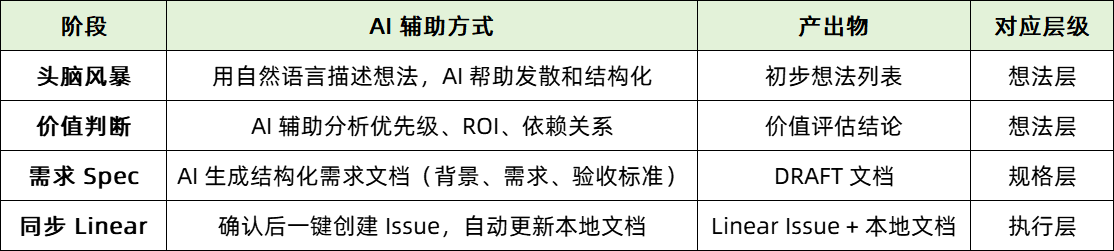
This process demonstrated significant effectiveness in the actual case.
Scenario: the inner monologue of a PM unfamiliar with the project upon seeing this sentence—
PM's inner monologue:
"Configure which defect types to analyze"... wait, let me sort this out:
- What feature is this? Which product module is it in? Is it a new feature or an optimization of an existing one?
- Why is configuration needed? Is it currently not configurable? Or is there a problem with the current way of configuring it?
- What does "analyze" refer to? Code scanning? Static analysis? Or vulnerability detection?
- What "defect types" are there? SQL injection? XSS? Or is there a standard classification? Where does it come from?
- Who configures it? Developers? Security personnel? Or system administrators?
- Where is it configured? The project settings page? A global config? Or within the scan task?
- How does the configuration take effect? Immediately? On the next scan? Or does it require a restart?
Now I need to:
- Set up a meeting with R&D to clarify the background (scheduling a meeting, 30 minutes at minimum)
- Look through related documents to see if there's a similar feature (might dig for ages and still find nothing)
- Mentally piece together possible implementation approaches (but unsure whether it's technically feasible)
- Write the requirement document (while worrying about missing key information)
A one-sentence requirement requires clarifying at least 10 questions behind it, taking 1 hour at minimum...
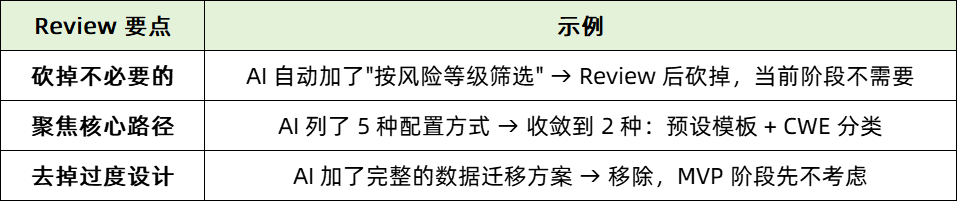
Take the one-sentence requirement "configure which defect types to analyze" as an example. Under the traditional model, the product manager needs to spend about 1 hour on background clarification, document writing, and task creation, whereas with AI assistance, the time is shortened to 9 minutes—an efficiency gain of about 83%. AI not only automatically supplements the feature background, generates configuration suggestions and acceptance criteria, but also improves document consistency and completeness through structured output. The human review step focuses on "subtraction"—for example, deleting the "filter by risk level" feature that is unnecessary at the current stage, and converging the 5 configuration methods proposed by AI down to the 2 most essential ones—embodying the key value of "making judgments."
Practice shows that the first version of a proposal generated by AI often pursues "completeness" rather than "applicability." Therefore, human review needs to focus on three points: first, deleting redundant features; second, converging onto the core path; third, avoiding over-design.
Product managers should proactively practice the principle of "first ask what not to do," cutting out about 30% of non-essential content in each review, and continuously validating assumptions by splitting requirements and delivering in phases. In addition, an advanced practice is to have AI analyze the code and distill a technical solution document after a feature goes live, thereby gradually accumulating an understanding of system capabilities that feeds back into subsequent product design, forming a "product–technology" closed loop.
Example of document directory organization:
seccortex/
├── 产品规划/        # Roadmaps, version planning, competitive analysis
├── 功能设计/        # Requirement Specs, PRDs, feature lists
│   └── issues/      # Local documents for Linear Issues
├── 界面设计/        # Interaction design, prototype descriptions
│   └── design-system/   # Design specifications (constraining AI generation via Claude Skills)
└── 技术方案/        # Technical implementation documents distilled by AI
    ├── CortexFlow源代码漏洞挖掘技术实现.md
    └── ...
Practice shows that the AI Native workflow not only greatly improves the efficiency of requirement analysis, document writing, and task management (generally exceeding 80%), but also drives the product manager role to evolve toward "judge" and "decision-maker." AI handles generation and execution, while humans focus on convergence, trade-offs, and value judgment, thereby achieving a true efficiency upgrade while ensuring quality.
Case 2: The Interface Design and Frontend Implementation Workflow
In the AI-assisted product design and development process, AI's core value lies in eliminating the "translation loss" between design and implementation, transforming the design draft from an intermediate state into directly deliverable code, achieving the simultaneous completion of design confirmation and code delivery.
The traditional workflow typically includes requirement explanation, producing design drafts, design review, R&D development, and UI walkthrough. This process commonly suffers from four major pain points: information loss between design and implementation; design reviews often getting bogged down in arguments over implementation cost; insufficient frontend fidelity triggering repeated adjustments; and an overly long cycle from design to final delivery.
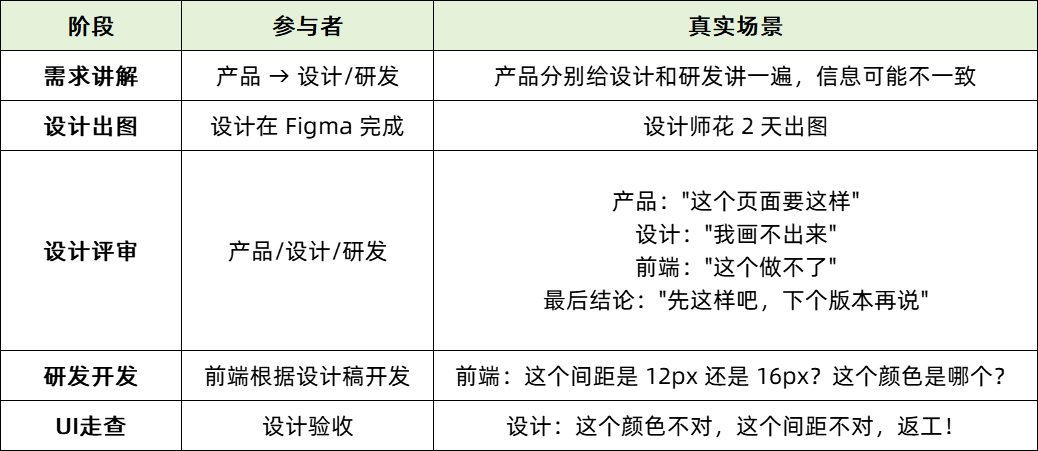
In the AI-optimized process, the workflow is restructured into: Figma UI draft → AI distills a Design System → Requirement Spec → Design Spec → frontend code. The key steps of this process include:
Step 1: Turn the Figma Design Draft into an AI-Understandable Design System
First, by turning the Figma design draft into an AI-recognizable Design System—including color specifications, component definitions, copy style, layout rules, and the typography system—a structured skill library is formed. This system enables AI to automatically follow consistency conventions when subsequently generating and adjusting code.
.claude/skills/design-system/
├── skill.md            # Entry point: tech stack, design values, core principles
├── colors.md           # Color specifications (CSS variable definitions)
├── typography.md       # Fonts, font sizes, line heights
├── layout.md           # Spacing, grids, layout rules
├── components.md       # Component usage conventions
└── copy-guidelines.md  # Copy conventions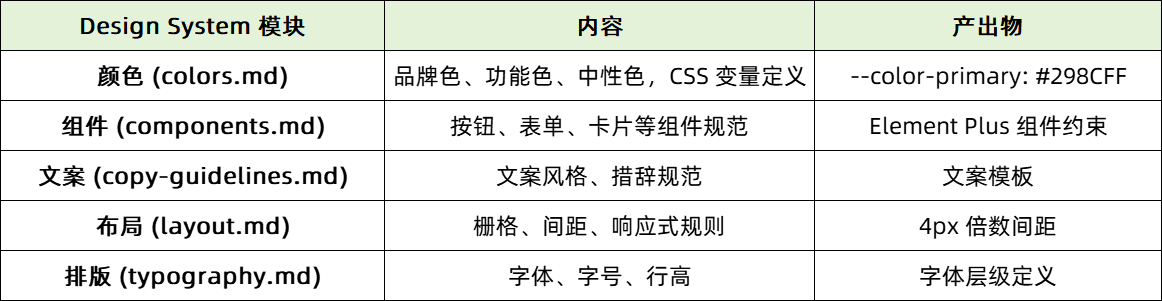
Step 2: Use Commands to Drive the Design Spec Process
The generation and modification of design specs are driven by core commands. For example, the /ui-spec command turns natural language requirements into a structured UI specification document, with AI proactively asking about details during the process to complete the information; while /ui-modify supports precise adjustments to an existing design spec and synchronously updates the document after the modification.

The /ui-spec workflow:
Requirement Spec + designer's description → AI asks follow-up questions to complete the information → generates a structured UI Spec → saves after confirmationAI will proactively ask:
- "Which fields does this list need to display?"
- "After clicking add, does it open a modal or navigate to a new page?"
- "Does it need to support search or filtering?"
The /ui-modify workflow:
Modification intent → AI confirms context (which page, which area) → outputs the modification spec → synchronously updates the original SpecAI will ask follow-up questions about location and change details:
- "Which page do you want to modify?"
- "What do you want it to become after the modification?"
Step 3: Generate Code Based on the Spec
AI generates or optimizes frontend code based on the confirmed design specifications. Using /ui-design, you can directly generate HTML, CSS, and JavaScript code conforming to the design system based on the Requirement Spec and UI Spec; while /ui-adjust can perform local style or layout iterative optimization on existing code, ensuring consistency with the design system.

The /ui-design workflow:
Requirement Spec + UI Spec → design and develop based on the Design System → output complete codeAI generates code based on existing documents:
- Reads the Requirement Spec to understand the feature goals
- Reads the UI Spec to understand the page structure, fields, and interactions
- Generates compliant code under the constraints of the Design System
- Output includes: design notes + HTML + CSS + JavaScript + usage instructions
The /ui-adjust workflow:
Collect adjustment requirements → read and analyze the code → apply design system conventions → generate an adjustment planAI will ask:
- Target file: which file needs to be adjusted?
- Adjustment content: what needs to be adjusted? (color, spacing, layout, interaction states, etc.)
- Specific elements: which elements does it target?
Output includes: adjustment notes + before-and-after comparison + complete code + change list.
Step 4: Design Delivery Is Code Delivery
Core change: After the design Spec is confirmed, AI directly generates frontend code, so design delivery = frontend code implementation.
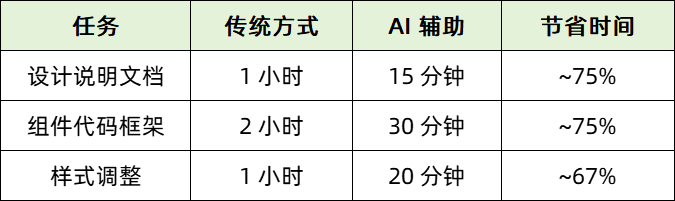
Design delivery no longer stops at the visual mockup stage but can be directly transformed into a runnable frontend implementation. Take the actual requirement of "displaying the data flow path on the vulnerability report page" as an example. Under this process, AI significantly improved efficiency: the time for the design notes document dropped from 1 hour to 15 minutes, scaffolding the component code framework was shortened from 2 hours to 30 minutes, and style adjustment time was compressed from 1 hour to 20 minutes—an overall efficiency gain of 67%–75%.
Through this AI-driven workflow, not only are information deviations and rework in the design-to-development process greatly reduced, but consistency at the visual and interaction levels is also ensured, enabling product design and technical implementation to advance in closer and more efficient coordination.
04 Summary of Key Techniques
Here I share three practical techniques for AI-assisted product work, with details as follows:
Technique 1: Document-Driven Development
Its core process is "idea → document → confirmation → implementation," following two key principles: first, the documentation step cannot be skipped—have AI generate the document first, then proceed to execution only after Review and confirmation; second, the document serves as the communication medium—humans clarify requirement intent through the document, and AI generates the corresponding code based on the document.
Technique 2: Progressive Confirmation
The core idea is not to have AI complete all the work in one go, but to advance in three steps. First, have AI generate a draft version to preview the overall structure of the content; second, use natural language commands like "remove this field" or "merge these two sections" to gradually adjust the details; finally, after confirming everything is correct at each step, proceed to the next work stage.
Technique 3: Combine Tools to Leverage Their Respective Strengths
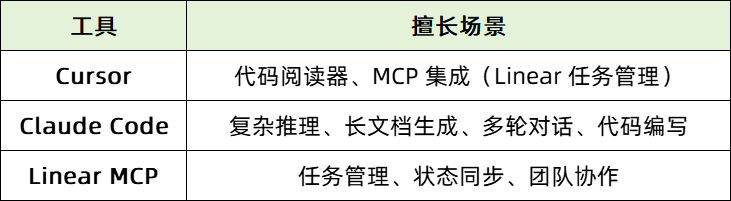
Efficiency is improved by matching different tools to the scenarios they excel at: Cursor is well-suited for reading code and integrating Linear task management (MCP); Claude Code excels at complex reasoning, long-document generation, multi-turn conversations, and code writing; Linear MCP focuses on task management, status synchronization, and team collaboration. Optimize the workflow by leveraging the complementary capabilities among the tools.
05 Reflections and Outlook
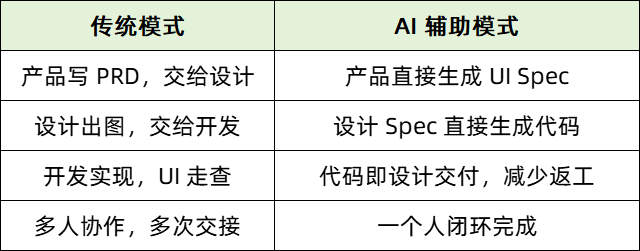
The AI era has driven the blurring of role boundaries in product work. The traditional division of labor is a linear process of "product manager → designer → frontend developer → backend developer," whereas in the AI era, this model has undergone two core changes: first, the boundaries among product, design, and development gradually blur; second, a single person can close the loop on the entire process of "requirements → design → code."
Looking specifically at the differences between the models: in the traditional model, product writes the PRD and hands it to design, design produces drafts and hands them to development, and after development implements them, a UI review is still required—the entire process involves multi-person collaboration and multiple handoffs. In the AI-assisted model, product can directly generate the UI Spec, the design Spec can be directly transformed into code, and code can be automatically delivered to reduce rework, ultimately achieving a one-person closed loop over the entire process.
The core of this change is: AI enables non-technical people to directly participate in the process from design to code.
In the division of labor between humans and AI, the core is "the importance of value judgment." The stronger AI's capabilities, the more critical human value judgment becomes. The division of labor in specific aspects each has its own emphasis:
- "What to do": humans choose the requirements to pursue, AI provides information and analyzes ROI;
- "What not to do": humans proactively cut out 30% of the content—although AI can be comprehensive, it requires human convergence;
- "When to do it": humans determine priorities, AI assists with dependency analysis and risk assessment;
- "How well it's done": humans Review the reasonableness of the proposal and define acceptance criteria and quality, while AI outputs the concrete proposal, writes the code, and performs automated checks.
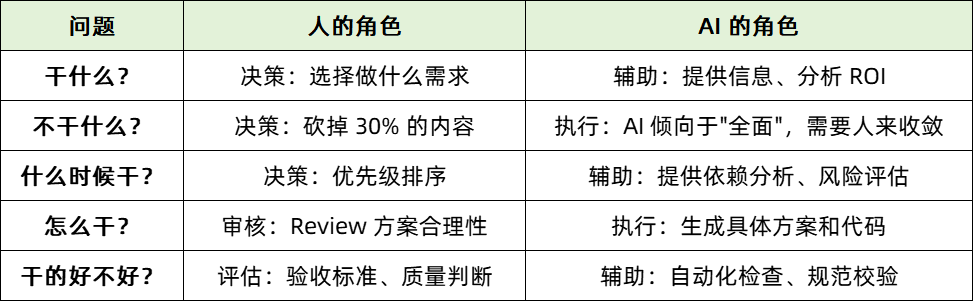
The corresponding core principle is also clear: AI takes on execution, optimization, and inspection work; humans are responsible for decisions, trade-offs, and setting priorities and quality standards; the human's value lies not in "doing," but in judging "what should be done" and "whether it's done right."
The key insight here is: The stronger AI becomes, the more important human judgment is. AI can help you complete 100 things, but selecting the 10 most worthwhile ones out of those 100 is precisely where human core value lies.
Finally, here is advice for beginners, in five points:
- Learn to describe requirements in natural language—for AI, understanding intent matters more than content format;
- Build a "document-first" habit—generate the document and Review it first, then proceed to execution;
- Make good use of tool combinations—different tools each have their strengths, and combining them yields better results;
- Maintain your own judgment—AI provides divergent content, and convergence and trade-offs are the human's core value;
- Proactively subtract—each time you Review AI output, first try to cut out 30% of the content.
Closing Thoughts
With the deep integration of Cursor, Claude Code, and Linear, even a product manager from a non-technical background can achieve an efficient closed-loop workflow. The specific approach can unfold across three layers.
At the idea layer, you need only describe the initial idea in natural language, and AI can assist with idea expansion and structured organization. The human's core task lies in making value judgments and key trade-offs from among them.
At the spec layer, AI automatically generates PRD and UI specification documents according to requirements and systematically applies the design system. At this point, the product manager needs to review the output content and proactively execute the strategic "trim 30%" subtraction.
At the execution layer, AI directly generates code and task tickets, achieving the simultaneous completion of design confirmation and code delivery. The human role shifts toward quality control and final acceptance, ensuring the results meet expectations.
The core philosophy running throughout can be summarized as: AI handles execution, humans focus on decisions; drive development with documents, confirming the direction step by step; always stay restrained, proactively executing subtraction.
Practice shows that this methodology can significantly improve work efficiency: the requirement analysis stage sees an efficiency gain of about 85%, and the design and frontend implementation stage sees an efficiency gain of about 70%, while improving output stability and fostering smoother team collaboration.